
命令列參數
Bandizip(Bandizip.exe)及其控制台應用程序(bz.exe)支持以下命令列參數:
# Bandizip.exe <command> [<switches>...] <archive> [<files>...] [<path_to_extract>]
# Bandizip.exe <bcommand> [<switches>...] [<files>...]
<archive>檔案
執行“設定”中指定的默認任務。(通常打開存檔。)
<command>指令
| a | 添加檔案到壓縮包 |
| x | 用完整路徑選取檔案 |
| t | 測試檔案的完整性 |
| d | 從存檔中刪除檔 |
| c | 創建新存檔(用相同名稱覆蓋現有存檔) |
| cd | 顯示“新建檔案”對話方塊 |
| rn | 重命名存檔中的檔案 |
| l | 列出存檔檔案(僅在bz.exe上可用) |
| /cmdfile | Read command lines from specified file |
<bcommand> 批處理指令
| bc | “使用每個檔案的名稱壓縮多個檔案/資料夾。 如果現有存檔具有相同的名稱,則會創建(存檔名稱)(2)、(存檔名稱)(3)…。如果未指定目標資料夾,則會在每個原始檔案所在的資料夾中創建存檔。” |
| bx | “將多個存檔檔案選取到目標資料夾。 如果未指定目標資料夾,則會將檔案解壓縮到每個存檔所在的資料夾。” |
| bt | 測試每個歸檔檔案的完整性。 |
<switches>開關
| - | 停止開關解析 |
| -l:<0...9> | 設定壓縮級別(0:存儲、1:快速、5:預設值、9:最大) |
| -r- | 禁用遞迴子目錄(預設) |
| -r | 啟用遞迴子目錄 |
| -aoa | 無提示覆蓋現有檔案 |
| -aos | 跳過並不覆蓋現有檔案 |
| -aou | 自動重命名選取的檔案 比如,name.txt→ name(2).txt |
| -sfx:"stub path" |
創建SFX存檔並設定SFX存根的完整路徑 (Bandizip c -sfx:"C:\Program Files\Bandizip\bdzsfx.x86.sfx" c:\out.exe c:\src.txt) |
| -zopfli | 使用Zopfil作為預設編碼器(慢速) |
| -p:{password} | 設定存檔的密碼 |
| -o:{dir} | 指定目的資料夾 僅適用於x命令和批次處理命令(bc、bx、bt) |
| -storeroot:<yes|no> |
-storeroot:yes 將根目錄存儲為存檔的頂級資料夾
-storeroot:no 不存儲存檔的頂級資料夾 |
| -y | 假設所有査詢都是 如果未發生錯誤,則在任務完成時關閉(解)壓縮視窗 |
| -ex:{list} |
指定壓縮時要排除的檔案清單 -ex:hello.txt -ex:"*.bak" -ex:"*.bak;*.tmp" -ex:*\.git |
| -root:{dir} | 壓縮時在存檔中指定根目錄 (-root:top_folder) |
| -fmt:{fmt} | 指定存檔格式 (zip, zipx, exe, tar, tgz, lzh, iso, 7z, gz, xz) |
| -v:{size} | 指定卷大小 (-v:1000000 -v:1440k -v:100MB ...) |
| -cmt:{comment} | 設定ZIP檔案注釋 (-cmt:Hello, -cmt:"Hello World!") |
| -cmtfile:{filepath} | 指定用作ZIP文件注释的文字文件的路径 (-cmtfile:mycomment.txt, -cmtfile:"c:\test\my comment.txt") |
| -t:NN | 指定壓縮時使用的CPU線程數 (-t:10, -t:1, -t:0) |
| -cp:NN |
指定打開或選取檔案時使用的內碼表 (Bandizip x -cp:932 japanese.zip) 可用內碼表的示例 - Chinese Simplified: 936 - Chinese Traditional: 950 - Japanese: 932 - Korean: 949 - UTF-8: 65001 |
| -target:auto | “使用此處選取智慧解壓縮功能將檔案選取到目的資料夾。 如果未指定目的資料夾,則會將檔案解壓縮到每個存檔所在的資料夾。” |
| -target:name | “將檔案解壓縮到目標資料夾中的存檔名稱資料夾。 如果未指定目標資料夾,則會將檔案選取到每個存檔所在資料夾中的存檔名稱資料夾。” |
| -date |
將當前系統時間插入檔案路徑。 請參攷strftime語法。  ⁑ Bandizip.exe c -date f:\backup\%Y\%m\Backup%Y-%m-%d_%H-%M-%S.zip c:\source\ |
<switches> (僅限 Bandizip)
| 壓縮且發送電子郵件 | |
| -target:dlg | 顯示一個對話方塊,要求指定目標資料夾,並將檔案解壓縮到目標資料夾中的存檔名稱資料夾。 如果使用-o指定了任何資料夾,則該資料夾是對話方塊的默認資料夾。 |
<switches> (僅限bz.exe)
| -list:v | 使用命令 l 时,显示文件的详细信息。 |
| -list:s | 使用命令 l 時,僅顯示檔名。 |
| -consolemode:ansi | 以ANSI格式保存輸出文字txt檔案。 |
| -consolemode:utf8 | 以UTF-8格式保存輸出文字txt檔案。 |
示例
開啟檔案
Bandizip.exe sample.zip
新建檔案(覆蓋已有檔案)
Bandizip.exe c c:\sample.zip c:\src\
Bandizip.exe c c:\sample.zip c:\src1\ c:\src2\
添加檔案到壓縮包
Bandizip.exe a c:\sample.zip c:\src\sample.txt
Bandizip.exe a c:\sample.zip c:\src\sample1.txt c:\src\sample2.txt
Bandizip.exe a c:\sample.zip c:\src\*.txt c:\src\*.jpg
從存檔中刪除檔
Bandizip.exe d c:\sample.zip sample.txt
Bandizip.exe d c:\sample.zip *.txt
Bandizip.exe d c:\sample.zip *.tmp *.bak
將檔案解壓縮到目的資料夾
Bandizip.exe x -o:c:\dest\ c:\sample.zip
將檔案添加到存檔,將密碼設定為Passw0rd,在不提示的情况下覆蓋現有檔案,然後關閉對話方塊
Bandizip.exe a -y -p:Passw0rd test.zip c:\src d:\src
將多個存檔檔案解壓縮到一個資料夾
Bandizip.exe bx -o:c:\dst a.zip b.zip c.zip
使用“自動解壓縮”功能將檔案從多個存檔選取到目標資料夾
Bandizip.exe bx -o:c:\dst -target:auto a.zip b.zip c.zip
使用每個資料夾的名稱(a.zip b.zip c.zip)壓縮多個資料夾(a.zip b.zip c.zip)
Bandizip.exe bc a b c
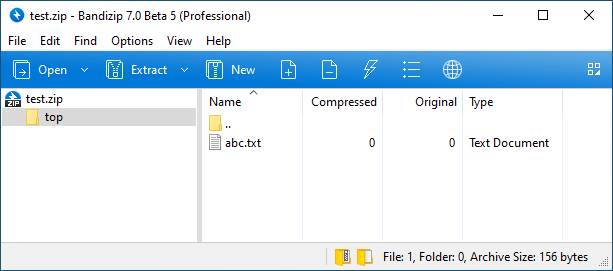
指定存檔的頂級資料夾
Bandizip c -root:top test.zip abc.txt
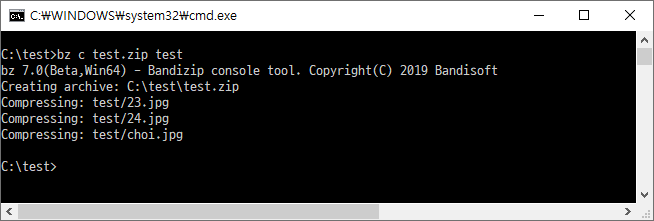
(bz.exe)創建新存檔
bz c test.zip test
重命名存檔中的檔案
重命名abc.txt為xyz.txt
Bandizip rn test.zip abc.txt xyz.txt
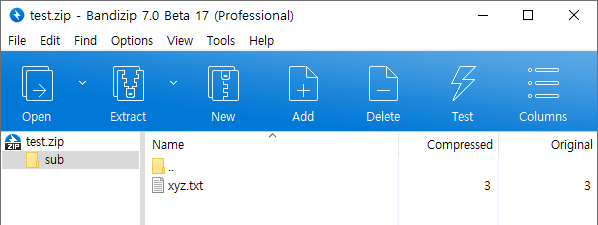
子資料夾內重命名abc.txt為xyz.txt
Bandizip rn test.zip sub/abc.txt sub/xyz.txt
重命名AAA.txt為XXX.txt為BBB.txt為YYY.txt
Bandizip rn test.zip AAA.txt XXX.txt BBB.txt YYY.txt
使用萬用字元選取檔案
在檔名中使用萬用字元來選取檔案或測試存檔
Bandizip x *.zip
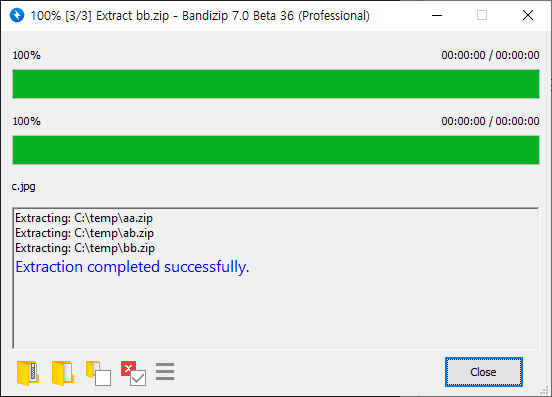
Bandizip t ABC??.zip
分別壓縮多個資料夾
使用每個資料夾的名稱壓縮資料夾,並在目標資料夾中創建存檔
Bandizip bc -aoa -o:d:\backup c:\src\folder1 c:\src\folder2 c:\src\folder3
c:\src\folder1 → d:\backup\folder1.zip
c:\src\folder2 → d:\backup\folder2.zip
c:\src\folder3 → d:\backup\folder3.zip
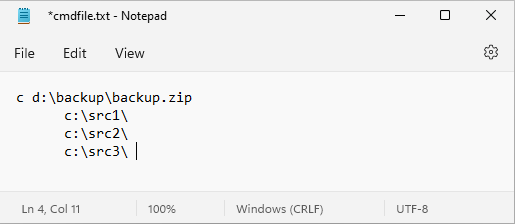
Read and execute command lines from specified file
Save long command lines as TXT file and call it
Bandizip /cmdfile cmdfile.txt
Bandizip /cmdfile c:/test/cmdfile.txt
Spaces in pahts
Use quotation marks when specifying long filenames or paths with spaces
Bandizip t "c:\folder name\file name.zip"
Bandizip x -o:"c:\out folder\" "c:\folder name\file name.zip"
Extract specified files only
Use filenames or wildcards to specify files you want from archive
Bandizip x sample.zip test.txt
Bandizip x sample.zip a.txt b.txt
Bandizip x sample.zip *.jpg
Bandizip x -r sample.zip *.jpg