
How to zip files with a custom filename
You can set a filename rule when compressing files with Bandizip. By specifying a rule that automatically includes the current time or date in the filename, you can easily organize and categorize your compressed files.
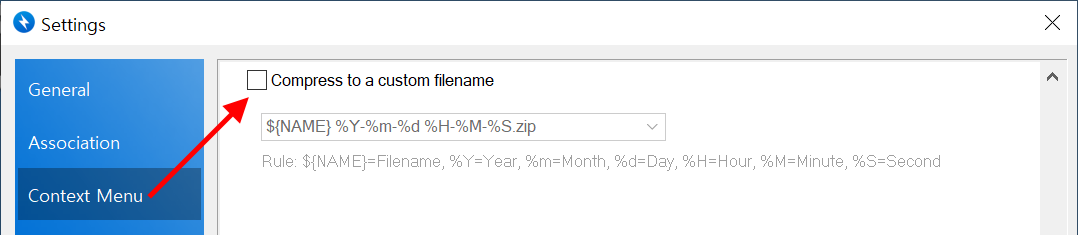
Enable the feature
- Open Bandizip and go to Settings (F5) → Context Menu tab.
- Check the "Compress to a custom filename" checkbox under the "Compress" section.
- Ensure that the feature appears and functions correctly in the right-click menu of File Explorer.
Available parameters
You can select one of the predefined rules or enter a custom rule.
| ${NAME} | Original filename |
| %Y | Year (4-digit) |
| %y | Year (2-digit) |
| %m | Month |
| %d | Day |
| %H | Hour |
| %M | Minute |
| %S | Second |
| .zip, .7z, .tar, ... | Compression format |
Examples
| Entered parameters | Entered parameters |
| ${NAME}_%Y%m%d.zip | ○○○_20250630.zip |
| %Y-%m-%d_%H-%M-%S.7z | 2025-06-30_17-30-45.7z |
| backup_%y%m%d.zip | backup_250630.zip |